
Preview selected mathematics
Select a formula in BBEdit and run Scripts → LaTeX — Preview Selection. The command updates a compact PNG preview window inside BBEdit. No shortcut is assigned automatically. Move/resize that window beside your source; subsequent previews reuse its placement. The source retains focus and its selection. If you switch documents during rendering, first-window creation is skipped. The helper does not activate BBEdit when another app is active.
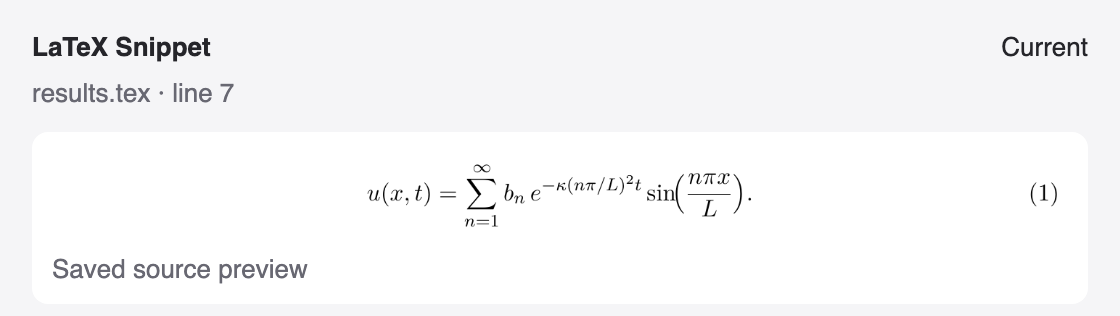
For right-click access, install the BBEdit-only Quick Action:
_build/default/bin/main.exe preview-service installThen select text and choose right-click → Services → LaTeX — Preview Selection. macOS may place it directly in the contextual menu depending on the available services. It also appears under BBEdit → Services. If hidden, enable it in System Settings → Keyboard → Keyboard Shortcuts → Services. The action does not replace selected text. It invokes the installed Scripts-menu command, which must remain installed, either as a development command or in the standard release package location. Remove ~/Library/Services/LaTeX — Preview Selection.workflow to uninstall the service. This service is a separate install from the BBEdit package. See Apple's service documentation. Raw math such as x^2 + y^2 = z^2 is wrapped in display math; complete $…$, \(…\), \[…\], and math environments such as equation or align* are used as selected. Include both opening and closing delimiters.
The preview uses the resolved main document's saved preamble, engine, default profile, and extra options. Preview does not save documents. For now, save any modified open project inputs explicitly before previewing; unsaved snapshots are not implemented yet. Relative preamble inputs are resolved from the main document's directory. There is no temporary edit to the source.
Cropping uses AUCTeX's standalone preview.sty package, with active,tightpage. This reuses the LaTeX component, not Emacs's inline-image UI. Display equations can retain the document's text width while the page height is cropped. MacTeX normally provides this package; Tectonic may download it. PNG conversion requires Poppler's pdftoppm (already installed on this machine).
Preview output is stored in a separate preview-… directory under bbtex's state directory, with one reusable directory per main file. The full document's PDF and compiler log are preserved. A failed manual preview opens its own compiler log. Automatic failures stay in the preview window; choose LaTeX — Open Preview Log to inspect the log for the current preview request. LaTeX — Cancel Build also cancels a preview for the same project, and a preview cannot overlap a full build or cleanup of that project.
With no custom options, pdfLaTeX/XeLaTeX/LuaLaTeX run a single pass. Custom options retain the latexmk route, and Tectonic uses its own pipeline. The most recent render per root is cached for the three direct TeX engines. Cache checks cover the selection, preamble, engine/options, environment, root directory entries, engine/renderer executables, and files recorded by TeX's .fls recorder. Tectonic and custom-option builds are not cached yet. Time-dependent or random macros may need the cache removed manually; caching is intended for stable math. Remove the root's preview-…/cache.inputs to force regeneration.
On the simple test fixture, rendering measured 0.22–0.50 s, PNG conversion 0.06–0.16 s, and cache validation 0.03–0.10 s. The complete native command measured 1.45 s with first window creation and 0.31 s with a cached result and existing window. The window polls the published image every 250 ms, adding up to that delay before a change appears. These are local test timings, not guarantees.
Preview status
The window shows the source file, cursor line, and one of Rendering, Current, Out of date, Preview failed, or Project busy. While rendering or after a failure, the previous image from that source may remain visible, dimmed and explicitly marked out of date. Switching source files clears the previous image. Current means the requested preview completed from saved inputs; it does not include unsaved changes in other editor buffers.
New requests replace older requests across manual and automatic preview. The running preview detects supersession and cancels its own compiler process group; it never cancels an unrelated full build. The final request check and image/status publication share a lock, so obsolete completions cannot overwrite newer state. The browser also rejects out-of-order responses and delayed image loads. Existing open preview pages migrate automatically when the next request arrives.
Limits
- The root must contain a literal
\begin{document}. The extractor skips normal TeX comments but does not expand macros or interpret conditional TeX code. - Only the preamble and selection are compiled. Definitions made earlier in the document body, surrounding environments, document counters, references, and bibliography state are not reconstructed. Use a full build when they matter.
- Select complete math, not a partial environment or a whole document. Raw text is treated as math. This is not a general figure/table extraction command.
- Package hooks and custom build options still execute as in normal compilation. Documents with unusual output routines may not support the preview package.
Verification
test/integration/check_preview.py compiles raw math and align* with pdfLaTeX, XeLaTeX, LuaLaTeX, and Tectonic, including a relative preamble input. It checks PDF dimensions, unchanged project files, empty selections, and failure logs. test/integration/check_live_preview.py exercises selection capture, PNG publication, preview-window reuse, and source-focus preservation in BBEdit. test/integration/check_live_selection.py exercises the live-selection watcher end to end — selection to Current, cached reuse, an invalid selection, and watcher shutdown on window close — and measures the latencies in Live selection. The actual HTML image refresh still benefits from user visual verification. Run all three with uv run; their dependencies are declared inline.
Refresh on save
Run LaTeX — Toggle Preview on Save from BBEdit’s Scripts menu for a saved TeX file. With the cursor inside a displayed equation, press ⌘S to refresh the PNG preview. Run the command again in that file to disable it. Enabling it in another file switches the tracked file. It is off by default; closing the preview window does not disable it.
This uses BBEdit’s documentDidSave attachment, not continuous typing capture. The initial implementation recognizes \[...\], equation, align, gather, multline, flalign (including starred forms), and displaymath environments. Inline math and $$...$$ are not recognized. Place the cursor inside a complete block; saves elsewhere mark the previous preview out of date. Included files use the existing main-file resolver and the main file’s saved preamble.
After an equation save, saving its resolved main file or a known input (such as an included macro file) refreshes that equation using its retained source and line. Foreground and background document saves work; unrelated saves are ignored. Dependency refresh updates an existing preview without opening a new window or moving focus. If the tracked source has changed on disk, save it with the cursor inside the intended equation to establish a fresh location. A manual selection preview replaces the automatic anchor; save an equation to resume tracking.
Known inputs come from the TeX recorder and survive cache invalidation and failed renders. pdfLaTeX, XeLaTeX, and LuaLaTeX supply them, including the latexmk path for custom options when recording remains enabled. For engines without recorder output, including Tectonic, only resolved-main-file refresh is guaranteed. Unsaved buffers and edits made outside BBEdit do not trigger the save attachment.
Rapid saves are coalesced and superseded renders are cancelled. Normal compilation suppresses the hook, interrupts the matching automatic preview, and waits for its compiler cleanup before starting the full build. The old preview is marked out of date; save an equation afterward to refresh it. Disabling or switching tracking also invalidates the old automatic request. Cancellation includes a short grace period for compiler children to stop.
Install the menu command with scripts/install-workflow-commands.sh and the attachment with scripts/install-preview-save-hook.sh --apply. The installer refuses to replace unrelated save attachments; those require manual integration. Background diagnostics are in ~/.local/state/bbtex/preview-on-save.log.
Release installation
Install bbtex.bbpackage in ~/Library/Application Support/BBEdit/Packages/. For the optional save hook and contextual service, run the bundled installers:
"$HOME/Library/Application Support/BBEdit/Packages/bbtex.bbpackage/Contents/Resources/install-preview-save-hook.sh" --apply
"$HOME/Library/Application Support/BBEdit/Packages/bbtex.bbpackage/Contents/Resources/bbtex" preview-service install
The attachment is not activated merely by copying a package into BBEdit. These installers add no duplicate Scripts-menu commands, and neither enables save tracking. Existing development menu links take precedence; use either the development setup (with its support package) or the full release package to avoid duplicate menus. Do not install the full package alongside development scripts. Package-only installs must retain the standard name and location above. The serialization helper uses macOS's /usr/bin/perl. The optional installers are a bash script and a bbtex subcommand; they need no Python or uv.
test/integration/check_save_preview_worker.py covers rapid saves, source switching, disabling tracking, saves during publication, build suppression, dependency routing, invalidated source locations, and failure status without native automation. check_preview_cancellation.py checks process-group cleanup and isolation from full builds. check_snippet_page.mjs checks the browser's ordering and safe text rendering with controlled image loads. check_save_preview.py checks real BBEdit equation saves, foreground/background macro saves, focus preservation, and a rendering error with disposable documents. It retains a temporary recovery backup and restores the prior tracking flag/image with a fresh publication revision.
Live selection
Run LaTeX — Toggle Live Selection Preview from BBEdit's Scripts menu in a saved TeX file to make the preview window follow the selection. Run the command again to turn it off. Enabling live selection turns off Preview on Save, and enabling Preview on Save turns off live selection.
A poller watches BBEdit's front window and selection: every 0.15 s while BBEdit is frontmost, every 1 s otherwise. A selection renders once it has been unchanged for 0.35 s, so drags and shift-arrow extension render only their final state. Moving the cursor without selecting, or selecting only whitespace, leaves the last preview unchanged. Reselecting a range after the selection moved renders it again, so an edited fragment refreshes; switching to another application and back does not. Unchanged fragments come from the render cache.
The selected fragment comes from the live, unsaved buffer; the preamble and dependencies still come from saved files, as in manual preview. Unlike manual preview, live mode does not refuse dirty buffers — the current document is almost always dirty while editing. Current means the preview matches the selection and was rendered with the saved preamble.
Delimited math ($…$, \(…\), \[…\], and math environments such as equation or align*) is used as selected. Raw text renders as math when the selection starts inside math in the buffer — as align* if it contains & or \\, otherwise as \[...\] — and as a prose paragraph at text width otherwise. Unbalanced braces or environments, an unclosed math delimiter, and a selection containing \documentclass, \begin{document}, or \end{document} are rejected with a message; the previous image stays, dimmed. Selections over 20 KB are rejected.
Live renders queue behind save previews and full builds on the same lock, so back-to-back selections never race for the project build lock and a build waits for a running render instead of being refused. While a full build is active, live rendering pauses — the window shows Project busy — and the settled selection renders once the build ends. The build is never cancelled for live preview. A render cancelled by a save or a build shows Preview cancelled; select again to retry.
Manual Preview Selection and a live render still share the project's build lock without queueing: if both run at once, the one that loses reports Project busy (manual preview as an alert).
The watcher stops when live mode is toggled off, when the preview window has been closed for 2 s, when no preview window appears within 10 s of starting, or when BBEdit quits. If the toggle fails to start the watcher, it notifies and stops the watcher rather than leaving it running with no window.
Diagnostics are in $BBTEX_STATE_DIR/live-selection.log (~/.local/state/bbtex/ by default). Manual Preview Selection is unchanged.
Measured locally on 2026-09-24 (Apple Silicon, BBEdit 15.5.5, pdfLaTeX) with test/integration/check_live_selection.py: 1.23 s from selection to Current on a cold render, 0.76 s when the render is cached, both including the debounce and poll. These are local timings, not guarantees.