
Project outline
Use LaTeX — Project Outline Window for the persistent tree (described below), or the original Project Outline dialog described here. Implementation and verification details are in the window notes.
Choose Scripts → LaTeX — Project Outline in a saved TeX document. Enter words from a heading, equation, caption, label, or filename; leave the search empty for the full outline. Search words are combined, with ASCII case-insensitive matching. Use kind:label, kind:equation, kind:figure, kind:table, or kind:section to restrict the entry type. Press Return to search, use the arrow keys to choose a result, and Return to go there. Escape cancels. Assign a shortcut through BBEdit's Scripts palette if desired; installation preserves existing shortcuts.
The outline displays section hierarchy, source paths and hard line numbers, equation text and figure/table captions. Labels remain separate entries, even when their names are duplicated. Partial-project warnings identify missing, dynamic, or cyclic inputs. Narrow searches with more than 300 matches.
This command reads saved files, starting at the same resolved main file as the build command. Each invocation rebuilds the small index without compiling TeX. Before a jump it checks the target file fingerprint, refuses an unsaved target buffer, and checks the destination line against the editor's contents. If a source changed, save/reload it as appropriate and invoke the outline again. Nothing is saved automatically. Other dirty buffers are not included in the index.
Scope and data contract
bbtex outline FILE [QUERY] emits version-1 JSON with root, savedOnly, issues, and entries. Each entry has kind, title, canonical file, one-based line, hierarchy depth, nearby context, and the saved file's fingerprint. The additive files and bibliographies fields expose indexed-file fingerprints and declared bibliography paths for the citation/reference pickers. This index is reusable by future reference pickers. outline-picker and outline-jump are native-dialog integration commands.
The scanner follows literal \input, \include, and \subfile paths, including bare \input filenames. Relative paths are tried from the root directory first, then the including file's directory. Missing extensions default to .tex. Canonical paths prevent cycles; a file included repeatedly is indexed once. Limits are 256 files, 64 include levels, and 4 MiB per source file.
Recognized entries: part/chapter/section/subsection/subsubsection/paragraph/ subparagraph, labels, \[...\], equation/align/gather/multline/flalign/displaymath/ eqnarray, and figure/table environments, including starred forms. Common macro definitions, comments, inline verb/lstinline, and verbatim/Verbatim/BVerbatim/ lstlisting/minted/comment environments are skipped. Titles retain TeX markup; no macro expansion, conditional evaluation, numbering, or bibliography parsing is attempted. Exotic definitions and custom environments remain outside scope. \includeonly and import/subimport are reported as unsupported, rather than claiming an exact compilation graph. This is a source outline, not compiled output.
Native capability audit and presentation decision
BBEdit's installed manual documents Search → Find Symbol in Workspace as a server-backed modal search, Go → Go to Definition, and the current-file function menu. These remain the preferred native symbol tools. The installed TexLab integration test confirms section document/workspace symbols alongside existing label/citation completion and definition lookup.
The installed BBEdit scripting dictionary exposes a functions-list palette but no supported API for retrieving its internal language-server symbol data. Starting a second TexLab session solely to mirror that data would require a new server lifecycle and buffer synchronization. The explicit saved-project outline therefore uses a bounded OCaml scanner and standard native dialogs. It adds stable duplicate-label entries and explicit snapshot validation without replacing the editor's existing symbol navigation or adding a persistent custom window.
Installation and verification
Development: scripts/install-workflow-commands.sh. Release packages include the menu command and project-outline.applescript resource. Background errors are recorded in ~/.local/state/bbtex/outline.log.
dune runtest covers hierarchy, duplicates, include/root cycles, comments, literal environments, search, and edited files. Run uv run test/integration/check_project_outline.py to check the JSON contract and compile native dialogs. Set BBTEX_TEST_NATIVE=1 to verify each fixture row's native mapping/jump and rejection of dirty buffers using disposable files. That automated test substitutes the dialog selection; actual keyboard behavior was confirmed by the user in BBEdit on 2026-09-21: search and Return-to-navigate work.
Persistent outline window
Choose Scripts → LaTeX — Project Outline Window from a saved TeX document. It opens an expandable, searchable outline and updates after saved-source changes. The original Project Outline dialog remains available.
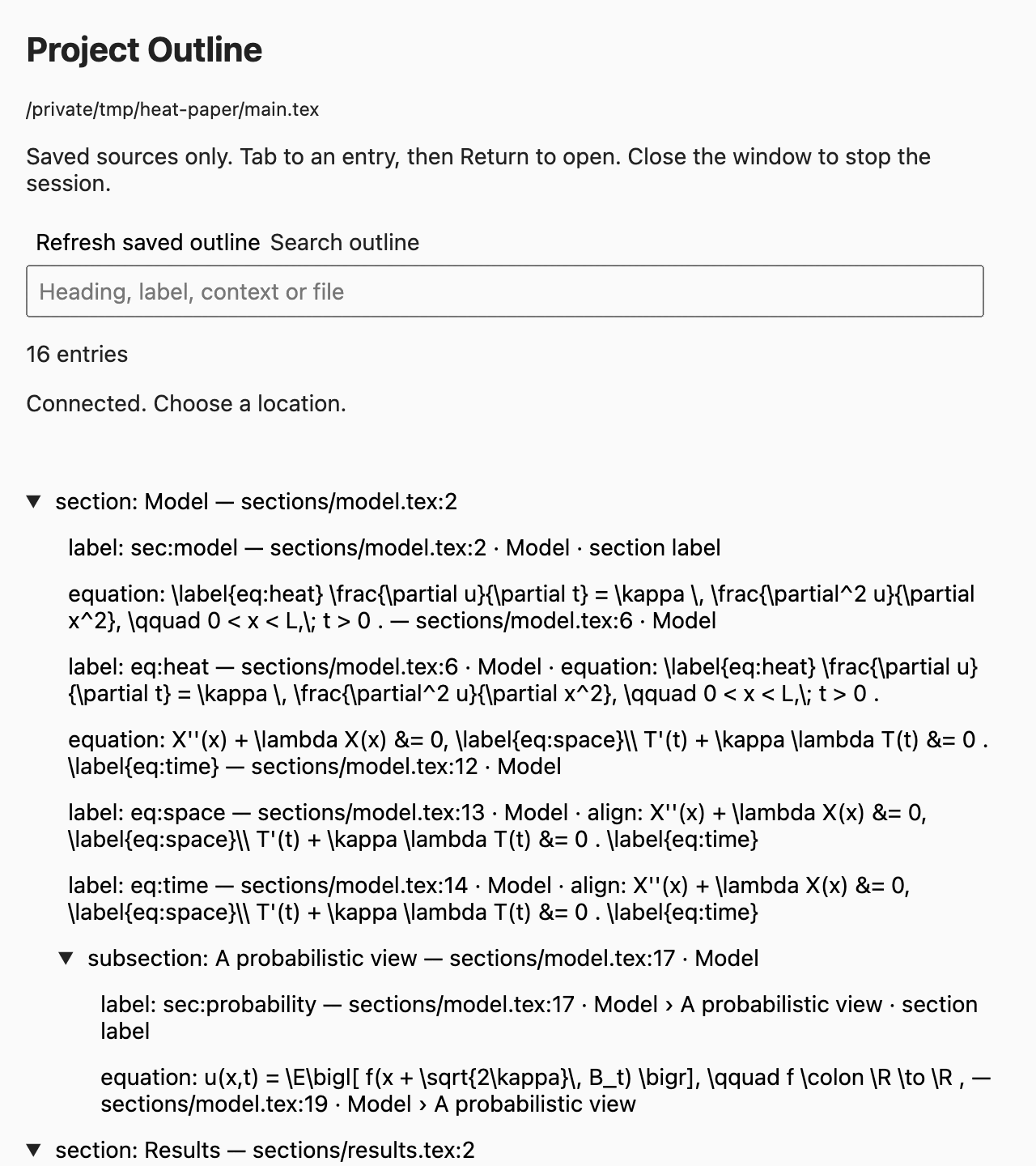
Each window stays pinned to the project shown at its top. Running the command from another file in that project reuses its window; running it from a different project opens a separate outline. Switching editor documents does not retarget an outline. Closing an outline stops its worker. Reopening starts a fresh session.
Refresh preserves search, expansion and the selected entry when their identities still exist. Navigation refuses unsaved target buffers: save, then refresh or wait for the automatic update. No document is saved automatically. The command stores private session files and a diagnostic session.log in the system temporary directory. The page is removed on close; the lock and log remain for reuse.